Add text to video, free
Put a title, a hook or any line of text on your video. Drag it into place and download it with no watermark.
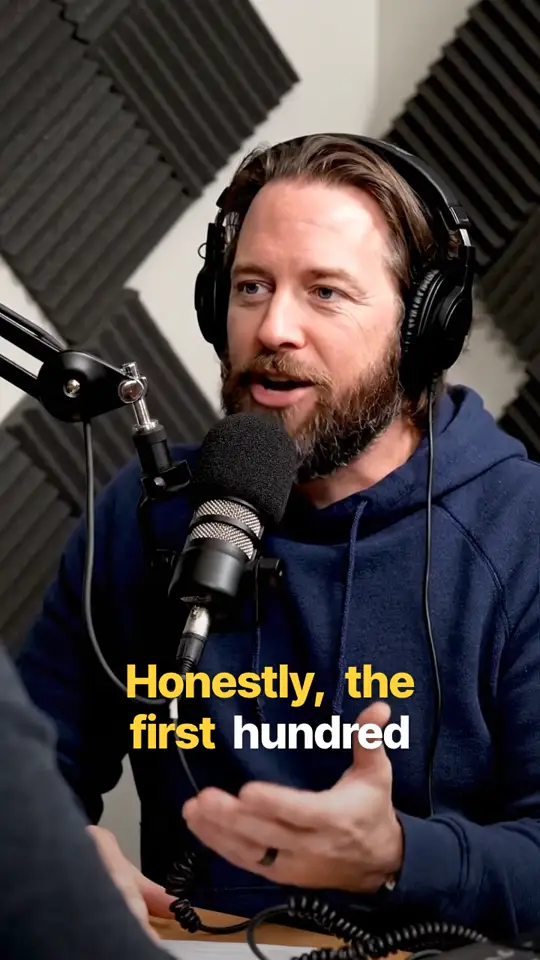
Three looks
Bold, rounded type that stays readable on a small screen.
- 1
White box
Black text on a white box, the classic TikTok look.
- 2
Colour box
A box in any colour from the palette.
- 3
Outline
White text with a dark outline, readable on any background.
Text and captions together
Instadraft also writes captions from what you say, so you can have a title at the top and animated captions lower down, in the same export. Or turn the captions into the only text by clearing the title.
Where to put text
On TikTok, Reels and Shorts the app's buttons cover the right edge and the bottom fifth of the screen. Keep text in the upper-middle part of the frame. The editor can shade the covered areas for each app; see safe zones.
Keep it short
People read on-screen text in a glance. Aim for under ten words, and say the same thing out loud if you can.
More free tools
- Caption generatorAnimated captions on any video, timed to every word.
- Hook generatorOpening lines that stop the scroll, added to your video.
- Video to textA transcript of your video as TXT, SRT or VTT.
- Resize videoMake any video 9:16, 4:5, 1:1 or 16:9.
- Video progress barA bar that fills as your video plays.
- Safe-zone guidesWhat TikTok, Reels and Shorts cover, with templates.
- YouTube title generatorClickable titles under 70 characters.
- YouTube description generatorDescriptions with a search-friendly first line.
- YouTube tag generator25 tags to paste into YouTube Studio.
Questions
How do I add text to a video?
Open Instadraft and drop in your video. Type your text, drag it where you want it and drag its corner to resize it. Then sign up free and export the MP4.
Is it free?
Yes. There is no watermark and no credit card. You need a free account to export.
Can the text show for only a few seconds?
Yes. Show it for the first 3 seconds, the first 5, or the whole video. A few seconds at the start is ideal for a hook.
Can I add text to a video on my iPhone?
Yes. Instadraft runs in Safari and Chrome on iPhone and Android, with nothing to install. Exporting is fastest on a computer.
Can AI write the text?
Yes. Press "Write hooks with AI" and it suggests opening lines based on what is said in your video.
Which videos work?
MP4, MOV and WebM, vertical, square or widescreen. Videos with speech get captions too; silent videos work for text alone.